

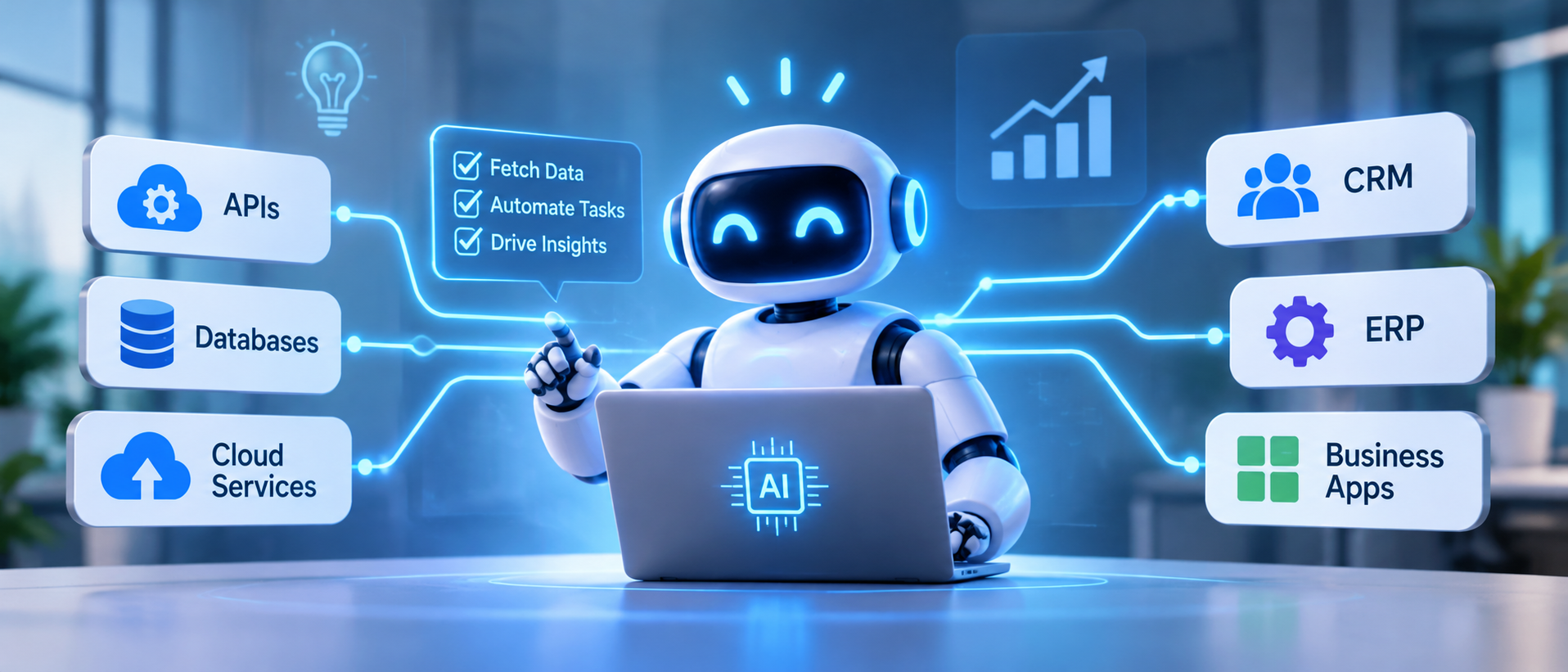
How AI Agents Connect with APIs, Databases, and Business Applications
Artificial intelligence is changing how businesses interact with software. What once required employees to move between multiple applications, search for information, copy data, and manually complete repetitive tasks can increasingly be handled through intelligent, connected workflows.
Consider a simple business scenario.
A customer sends a message asking about an order. An AI agent needs to identify the customer, retrieve the order details from the company's database, check the latest delivery status through a logistics API, and provide an accurate response. If the customer wants to change the delivery address, the agent may need to check the company's policy, verify the customer's identity, and submit an authorised update to the order management system.
A standalone chatbot cannot reliably complete this entire process just by generating a response. It needs access to business systems, structured information, and approved operations.
This is where AI agent integration becomes important.
By connecting AI agents with APIs, databases, enterprise applications, and internal services, businesses can create systems that do more than answer questions. They can retrieve information, coordinate workflows, update records, trigger actions, and assist employees with multi-step business processes.
However, connecting an AI agent to business software is not simply a matter of giving a language model access to every system. It requires a carefully designed integration architecture that controls how information is accessed, how actions are executed, and how business rules are enforced.
This guide explains how AI agents connect with APIs, databases, and business applications, how the integration process works, which technologies are involved, and what businesses should consider when implementing connected AI agent solutions.
What Is AI Agent Integration?
AI agent integration is the process of connecting an AI agent with external tools, APIs, databases, enterprise applications, and business services so that it can retrieve information and perform approved actions as part of a workflow.
An AI agent typically combines an AI model, instructions, context, tools, and an execution environment. The model interprets a request and determines which available tool may help complete the task. The surrounding application or agent runtime handles the actual tool execution, validates the request, applies permissions, and returns the result.
For example, an AI agent connected to a CRM system may be able to:
- Retrieve customer records.
- Review previous interactions.
- Summarise sales opportunities.
- Identify missing information.
- Create a follow-up task.
- Update an approved customer field.
- Prepare a sales report.
The agent does not need unrestricted access to the CRM database. Instead, developers can expose specific operations, such as `get_customer`, `search_opportunities`, or `create_follow_up_task`.
This distinction is important. The AI model can decide which operation is appropriate, but the business application should remain responsible for authenticating the request, validating the data, enforcing permissions, and executing the action.
AI Agent Integration vs Traditional Software Integration
Traditional software integrations usually follow predefined rules. When a particular event occurs, one system sends information to another through a programmed workflow.
AI agent integration introduces an additional decision-making layer. An agent can interpret a request, select from available tools, use returned information, and determine what step should happen next.
| Area | Traditional software integration | AI agent integration |
|---|---|---|
| Workflow | Usually predefined | Can adapt within defined boundaries |
| Input | Structured events and data | Natural language, structured data, or events |
| Decision-making | Programmed rules | Model-based reasoning combined with application rules |
| System access | Configured connections | Explicitly exposed tools and integrations |
| Execution | Predetermined actions | Actions selected according to the task and available tools |
| Exception handling | Rule-based paths | Can interpret exceptions and request assistance |
| Human involvement | Depends on workflow design | Can request approval or escalate when required |
AI agents do not replace conventional integration logic. In many enterprise systems, the most reliable approach combines deterministic software workflows with AI-based interpretation and decision-making.
How Do AI Agents Connect with APIs, Databases, and Business Applications?
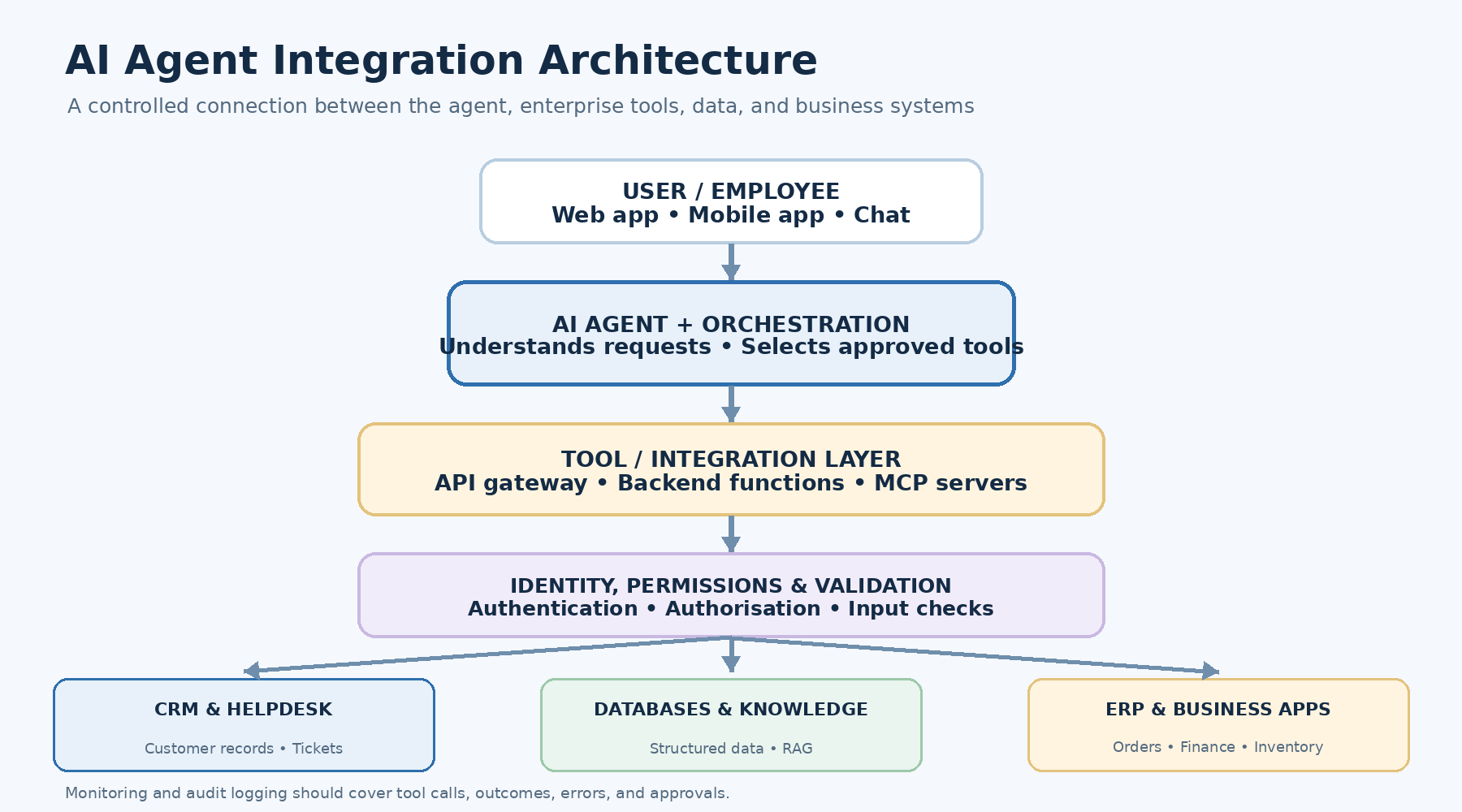
AI agents generally do not connect directly to every business system. A controlled integration layer exposes the information and actions that the agent is permitted to use.
A typical architecture includes several components:
- User interface: The employee or customer submits a request through a web application, mobile app, or chat interface.
- AI agent: The agent interprets the request and determines the steps required.
- Tool or integration layer: Exposes approved functions, APIs, and connectors.
- Authentication and authorisation: Checks the identity, permissions, and scope of the requested operation.
- Business systems: CRM, ERP, databases, payment platforms, ticketing systems, and other applications process the request.
- Execution and response handling: Results are validated and returned to the agent.
- Monitoring and audit: Records tool calls, outcomes, errors, and relevant decisions.
AI Agent Integration Architecture
The following diagram illustrates a common enterprise integration pattern.
                USER / EMPLOYEE
                       |
                       v
              Web App / Mobile App
                       |
                       v
                 AI AGENT
          Understands task and context
                       |
                       v
             AGENT ORCHESTRATION
          Plans steps and selects tools
                       |
                       v
          TOOL / INTEGRATION LAYER
           Approved functions and APIs
                       |
                       v
          AUTHENTICATION & POLICIES
        Identity, permissions, validation
                       |
          +------------+------------+
          |            |            |
          v            v            v
       CRM API      ERP API     Database API
          |            |            |
          v            v            v
      Customer      Orders &     Business
       Records      Inventory      Data
          |            |            |
          +------------+------------+
                       |
                       v
             VALIDATED TOOL RESULTS
                       |
                       v
                  AI AGENT
                       |
                       v
             RESPONSE / NEXT ACTION
                       |
                       v
             MONITORING & AUDIT
This is a conceptual architecture rather than a mandatory technology stack. A smaller application may use a few application functions, while a large enterprise deployment may require API gateways, integration platforms, dedicated identity services, message queues, and separate agent orchestration components.
The important principle is that the AI agent should interact with business systems through controlled interfaces rather than unrestricted access.
1. How AI Agents Connect with APIs
APIs, or Application Programming Interfaces, allow different software systems to exchange information and request operations.
For AI agents, APIs provide a structured way to interact with external applications.
For example, a business may expose APIs that allow an agent to:
- Retrieve customer information from a CRM.
- Check inventory availability.
- Create a support ticket.
- Retrieve an invoice.
- Check a payment status.
- Update an order.
- Schedule an appointment.
- Generate a business report.
The agent does not need to understand the internal implementation of every application. It needs access to clearly defined tools that describe what operations are available and what information they require.
How API-Based AI Agent Integration Works
Suppose a customer asks:
"Can you check whether order #45821 has been shipped?"
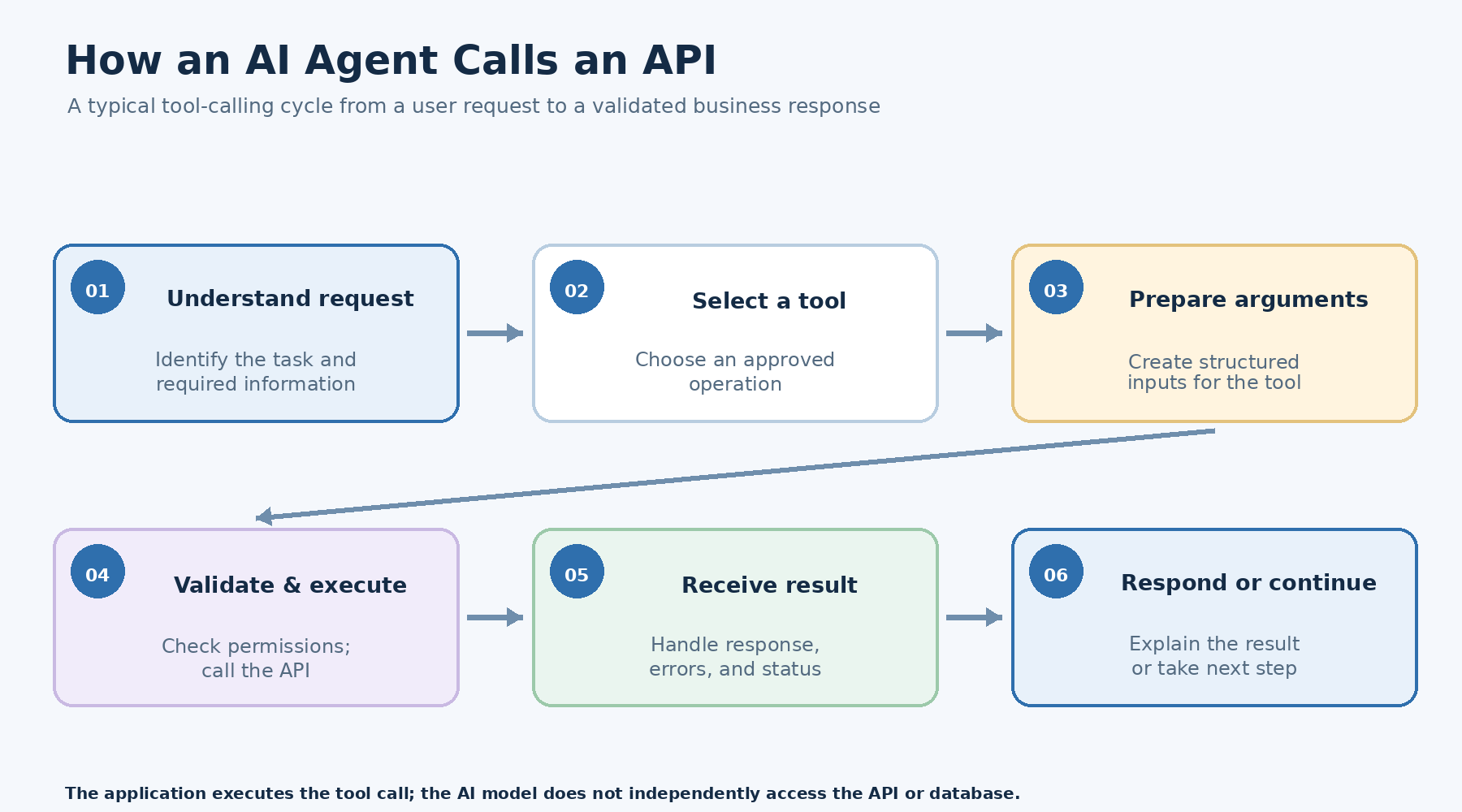
The process may look like this:
Step 1: Understand the request
The AI agent identifies that the user wants an order status.
Step 2: Select the appropriate tool
The agent selects an approved function such as `get_order_status`.
Step 3: Generate structured arguments
The agent prepares the required order identifier.
Step 4: Execute the API request
The application's integration layer validates the arguments, checks the user's access, and calls the order management API.
Step 5: Retrieve the result
The API returns structured information, such as the order status, shipment reference, and estimated delivery information.
Step 6: Interpret and respond
The AI agent uses the returned information to explain the order status in natural language.
A simplified tool definition might look like this:
{
  "type": "function",
  "name": "get_order_status",
  "description": "Retrieve the status of an authorised customer order",
  "parameters": {
    "type": "object",
    "properties": {
      "order_id": {
        "type": "string",
        "description": "The customer's order reference"
      }
    },
    "required": ["order_id"],
    "additionalProperties": false
  }
}
This describes the operation the model can request. It does not itself execute the API call. The application must implement the function, validate the arguments, check access permissions, and return the actual result.
For developers building this type of integration, the OpenAI Function Calling documentation explains how models request functions, how applications execute them, and how tool results are returned to the model.
Common API Types Used in AI Agent Integration
| API type | Purpose | Example AI agent activity |
|---|---|---|
| REST API | Exchange data through HTTP endpoints | Retrieve customer or order information |
| GraphQL API | Request specific data through queries | Fetch selected CRM fields |
| Webhook | Notify another system when an event occurs | Start a workflow after a payment event |
| Internal API | Connect services within an organisation | Retrieve employee or operational data |
| Payment API | Access payment operations | Check transaction status |
| Communication API | Connect messaging and notification services | Send approved customer updates |
Not every integration requires the same API style. The choice depends on the existing application, data structure, performance requirements, and security model.
What Happens When an API Request Fails?
An agent should not assume that every API call succeeds.
A request may fail because:
- The service is unavailable.
- The user does not have permission.
- The supplied identifier is incorrect.
- The API rate limit has been reached.
- The request contains invalid information.
- A downstream system returns an unexpected response.
A well-designed integration layer should handle errors, retries where appropriate, timeouts, and fallback behaviour.
For example, if an order API is temporarily unavailable, the agent should explain that it cannot retrieve the latest status instead of inventing a delivery update.
2. How AI Agents Connect with Databases
Databases store the information businesses rely on to operate. This may include customer profiles, employee records, product information, transactions, inventory, invoices, operational logs, and application data.
Connecting AI agents with databases allows them to retrieve relevant information and support data-driven workflows.
However, database integration requires particular care because databases often contain sensitive and business-critical information.
Common Database Integration Approaches
There are several ways to connect AI agents with database systems.
1. Application APIs
The agent accesses database information through existing backend APIs. The application controls which records and fields can be retrieved.
This is often a suitable approach when a business already has a well-developed application layer.
2. Backend functions
Developers create specific functions that execute approved database queries.
For example:
- `get_customer_profile`
- `search_inventory`
- `get_invoice_details`
- `retrieve_sales_summary`
The agent can request these functions, while application code handles the actual database operation.
3. Database connectors
A controlled connector can provide a standard interface between the agent and database operations. The connector manages details such as authentication, query execution, connection handling, and observability.
4. Retrieval-Augmented Generation (RAG)
When the agent needs to search large collections of documents or unstructured business information, a retrieval system can find relevant content and provide it to the model as context.
RAG is particularly useful for internal knowledge bases, policy documents, technical manuals, contracts, and product documentation.
Structured Databases vs Vector Databases
Businesses should understand the difference between traditional databases and vector databases because they support different types of retrieval.
| Database type | What it stores | Typical AI agent use |
|---|---|---|
| Relational database | Structured records and relationships | Customer, order, invoice, and employee queries |
| NoSQL database | Flexible or document-oriented data | Application records and variable data structures |
| Data warehouse | Analytical and historical business data | Reporting, business summaries, and trend analysis |
| Vector database | Numerical representations of information called embeddings | Semantic search across documents and knowledge bases |
| Search index | Searchable documents and indexed content | Finding relevant policies, manuals, and records |
A vector database does not automatically replace a transactional database.
For example, if an agent needs to retrieve the current balance of a customer's account, it should use an authoritative transactional system. Semantic retrieval from a vector database is not an appropriate substitute for a current financial record.
Similarly, if an employee asks, "What is our policy for approving software purchases?", a retrieval system can search internal policy documents and provide relevant passages.
The right data source depends on the question and the level of accuracy required.
Example: AI Agent Retrieving Information from a Database
Consider a procurement agent that helps employees understand purchase requests.
An employee asks:
"Show me the pending purchase requests for the marketing department."
The agent may follow this workflow:
- Identify the requested department.
- Verify the employee's identity and access permissions.
- Call an approved procurement query function.
- Retrieve matching records from the database.
- Validate the returned results.
- Summarise pending requests.
- Provide the information without exposing records outside the employee's access scope.
The application might execute a parameterised database query such as:
SELECT
    request_id,
    department,
    request_status,
    submission_date
FROM purchase_requests
WHERE department = :department
  AND request_status = :status;
The values should be supplied through validated parameters. Developers should avoid allowing an AI model to generate and execute unrestricted SQL against production databases.
For sensitive systems, read-only access, query restrictions, row-level permissions, and carefully scoped backend functions are important safeguards.
3. How AI Agents Connect with Business Applications
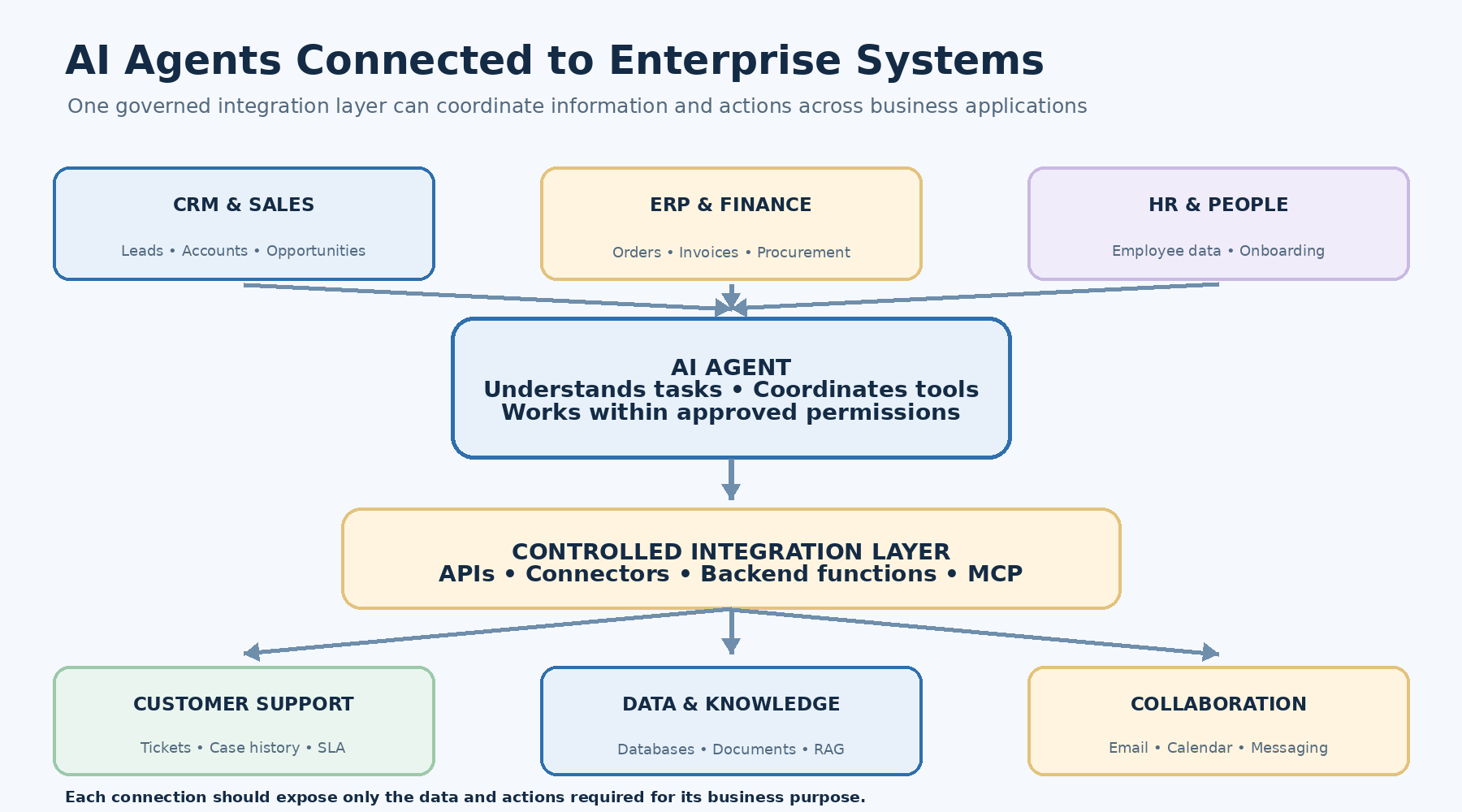
APIs and databases provide technical connectivity, but business applications contain the workflows employees use every day.
An AI agent can connect with these applications to help coordinate work across departments.
Common enterprise systems include:
- Customer Relationship Management (CRM).
- Enterprise Resource Planning (ERP).
- Human Resource Management Systems (HRMS).
- Helpdesk and ticketing platforms.
- Project management software.
- Accounting and finance applications.
- Inventory management systems.
- Email and collaboration platforms.
- Document management systems.
- Marketing automation platforms.
AI Agent Integration with CRM Systems
CRM platforms contain information about customers, leads, sales opportunities, communication history, and business relationships.
A CRM-connected AI agent may help sales teams:
- Retrieve customer information.
- Summarise previous conversations.
- Identify overdue follow-ups.
- Prepare meeting summaries.
- Update approved CRM fields.
- Create sales tasks.
- Generate opportunity reports.
Example workflow:
A sales manager asks:
"Find the high-priority opportunities that have not been contacted this week and prepare follow-up tasks."
The agent can retrieve authorised opportunity records, evaluate the relevant dates and priority fields, identify matching records, and prepare follow-up tasks.
Depending on the business rules, it may create those tasks automatically or request approval before saving them.
AI Agent Integration with ERP Systems
ERP applications manage important business processes such as procurement, finance, inventory, production, and supply chain operations.
An ERP-connected AI agent may:
- Check inventory availability.
- Retrieve purchase order details.
- Summarise supplier information.
- Identify overdue invoices.
- Retrieve production updates.
- Prepare procurement reports.
- Assist with order processing.
For example, a procurement agent could retrieve supplier quotations, compare them against predefined criteria, and prepare a recommendation for an authorised employee.
The agent should not approve purchases or transfer funds merely because it can access the ERP. Financial and operational actions must follow the organisation's approval rules.
AI Agent Integration with Helpdesk Systems
Customer support agents can connect with ticketing platforms to retrieve case history and coordinate support activities.
Possible capabilities include:
- Creating support tickets.
- Categorising incoming requests.
- Retrieving previous cases.
- Checking ticket status.
- Suggesting responses.
- Escalating unresolved issues.
- Updating approved ticket fields.
A connected support agent can retrieve information from a ticketing platform and relevant knowledge base before preparing a response.
This reduces the need for employees to search multiple systems manually.
AI Agent Integration with HR Systems
HR-connected agents can support employee self-service and internal processes.
Examples include:
- Answering questions about leave policies.
- Retrieving authorised employee information.
- Explaining onboarding steps.
- Helping employees find internal documents.
- Creating HR service requests.
- Checking application or request status.
HR integrations require strict access control because employee records may contain sensitive personal information.
AI Agent Integration with Email and Collaboration Tools
Agents can also connect with email, calendars, messaging platforms, and document systems.
For example, an executive assistant agent may:
- Review an authorised meeting request.
- Retrieve calendar availability.
- Identify suitable meeting times.
- Prepare an invitation.
- Request approval if required.
- Send the invitation through an approved calendar integration.
This is an example of an agent coordinating several tools to complete one business objective.
4. What Is the Role of MCP in AI Agent Integration?
As businesses connect agents with more applications, managing individual integrations can become increasingly complex.
Each application may have different API structures, authentication requirements, tool definitions, and connection methods.
The Model Context Protocol (MCP) provides a standardised way for AI applications to connect with external tools and data sources through MCP servers.
In simple terms, MCP can help make tools and resources available through a consistent interface rather than requiring every AI application to implement a completely different integration pattern.
An MCP server may expose:
- Tools: Operations an AI application can request, such as searching a CRM or creating a ticket.
- Resources: Context or information that an application can retrieve.
- Prompts: Reusable prompt templates exposed by the server.
How MCP Fits into an AI Agent Architecture
             AI AGENT
                 |
                 v
          MCP CLIENT
                 |
                 v
          MCP CONNECTION
                 |
        +--------+--------+
        |        |        |
        v        v        v
      CRM MCP  Database  ERP MCP
      Server   MCP Server Server
        |        |        |
        v        v        v
      CRM API  Database  ERP API
The MCP layer can simplify tool discovery and communication, but it does not automatically solve every integration challenge.
Authentication, authorisation, input validation, data governance, and business rules still need to be implemented appropriately.
MCP is also not a replacement for APIs. APIs remain the underlying interfaces many systems use to exchange data and perform operations. MCP can provide a standardised way for AI applications to discover and use selected capabilities.
For organisations developing multiple connected AI agents, MCP may help establish reusable integration patterns.
5. How to Build an AI Agent Integration Architecture
A successful integration project starts with the business workflow, not with the number of tools an agent can access.
The following process provides a practical approach.
Step 1: Identify the Business Problem
Start by identifying a process that involves repetitive information retrieval, multiple applications, or manual coordination.
Examples include:
- Customer support enquiries requiring CRM and order information.
- Sales follow-ups involving email and CRM data.
- Procurement requests involving inventory and ERP systems.
- Employee queries involving HR policies and internal records.
- Invoice processing involving documents and accounting software.
Define the problem in measurable terms.
For example:
"Employees currently need to check three separate systems to answer an order-status enquiry."
This gives the project a clear purpose.
Step 2: Map the Existing Workflow
Document how the process currently works.
Identify:
- Who initiates the task.
- Which information is required.
- Which applications are involved.
- Which decisions must be made.
- Which actions are performed.
- Where approvals are required.
- What happens when something goes wrong.
This helps identify where an AI agent can provide value and where conventional automation is more appropriate.
Step 3: Identify the Required Systems and Data
Create an inventory of the systems the agent needs to access.
For example:
| Business requirement | Required system | Integration method |
|---|---|---|
| Retrieve customer information | CRM | API or approved connector |
| Check order status | Order management system | API |
| Retrieve product availability | Inventory database | Backend function or API |
| Search product documentation | Knowledge base | Search or RAG |
| Create a support case | Helpdesk | API or MCP tool |
| Notify the customer | Email or messaging platform | Communication API |
This step helps define integration dependencies before development begins.
Step 4: Define Tools and Permissions
Instead of exposing an entire application, create a set of clearly defined operations.
For example:
| Tool | Purpose | Access type |
|---|---|---|
| `get_customer` | Retrieve authorised customer information | Read |
| `get_order_status` | Retrieve order status | Read |
| `search_inventory` | Check available stock | Read |
| `create_support_ticket` | Create a support request | Write |
| `update_delivery_address` | Request an address update | Restricted write |
| `issue_refund` | Process an approved refund | High-impact action |
Each tool should have a clear description, input schema, expected output, and permission requirements.
High-impact actions should have additional controls, such as approval workflows, transaction limits, or verification requirements.
Step 5: Design the Integration Architecture
Choose how the agent will communicate with each system.
Depending on the existing technology environment, the architecture may use:
- REST or GraphQL APIs.
- Backend functions.
- API gateways.
- Integration platforms.
- MCP servers.
- Event-driven messaging.
- Database connectors.
- Retrieval systems.
The goal is to provide reliable access without exposing unnecessary infrastructure or sensitive information.
Step 6: Develop the Agent and Tool-Calling Workflow
The agent should be configured with:
- Its purpose and operating instructions.
- Available tools.
- Tool descriptions and input schemas.
- Context and retrieval mechanisms.
- Decision boundaries.
- Error-handling behaviour.
- Human approval requirements.
The agent should also know when it must not take an action.
For example, if a user asks it to change a bank account number but the application cannot verify the user's identity, the agent should refuse the action or route the request to an authorised process.
Step 7: Test the Complete Integration
Testing should cover more than whether the API responds.
The team should test:
- Correct tool selection.
- Input validation.
- Authentication and permissions.
- Data accuracy.
- API failures.
- Rate limits and timeouts.
- Duplicate requests.
- Transaction handling.
- Approval workflows.
- Incorrect or malicious user instructions.
- Audit logging.
- Recovery and escalation.
A successful test should confirm that the complete business workflow behaves correctly, including its failure paths.
Step 8: Deploy, Monitor, and Improve
Once the integration passes testing, it can be deployed in a controlled environment.
Start with a limited group of users or a low-risk workflow where possible.
Monitor:
- Tool-call success rates.
- API response times.
- Failed requests.
- Incorrect tool selections.
- Data retrieval accuracy.
- Human escalation rates.
- Cost per completed workflow.
- User feedback.
- Security events.
Use these findings to improve tool descriptions, permissions, workflow design, and agent behaviour.
6. Practical Example: Connecting an AI Agent with CRM, ERP, and Database Systems
Consider a B2B technology company that receives enquiries from existing customers about orders, invoices, and support requests.
Its employees currently switch between the CRM, ERP, accounting software, and helpdesk to answer each enquiry.
A connected AI agent could coordinate these systems through approved tools.
Example customer request
"Please check the status of my latest order and tell me whether the invoice has been generated."
Integration workflow
1. Identify the customer
The agent requests the customer's identity or uses an authenticated session.
2. Retrieve customer information
It calls an approved CRM function to retrieve the authorised customer record.
3. Retrieve order details
It calls the order management API to identify the latest relevant order.
4. Check invoice information
It calls the accounting or ERP integration to retrieve the invoice status.
5. Validate the information
The integration layer checks that the returned records belong to the authenticated customer and that the information is current.
6. Generate the response
The agent summarises the order and invoice status in a clear response.
7. Offer the next action
If the invoice is not available, the agent can explain the status or offer to create an authorised follow-up request.
Example output
| System | Information retrieved | Result |
|---|---|---|
| CRM | Customer identity | Verified |
| Order management | Latest order status | Processing |
| ERP | Invoice status | Generated |
| Accounting | Invoice reference | Retrieved |
<em>Illustrative example only. These are sample workflow results, not measured Spectrum customer data.</em>
The main benefit is that employees and customers can interact with a single interface while the agent coordinates the underlying business systems.
7. Security and Governance in AI Agent Integration
Connecting AI agents to business applications introduces security considerations that should be addressed before deployment.
An agent that can read information or perform actions needs clearly defined boundaries.
Authentication and Identity Management
The system should verify who is using the agent and what identity the agent is operating under.
Depending on the architecture, this may involve:
- Single sign-on.
- Multi-factor authentication.
- OAuth-based authorisation.
- Service identities.
- Short-lived access tokens.
- Secure credential storage.
An agent should not inherit unrestricted access simply because it operates inside an authenticated application.
Role-Based and Fine-Grained Permissions
Permissions should be based on the user's role, the requested operation, and the data involved.
For example, a sales representative may be allowed to retrieve assigned customer records but not access payroll information or approve financial transactions.
The backend must enforce these restrictions independently of the agent's instructions.
Human Approval for Sensitive Actions
Not every action should be automated.
Actions that may require approval include:
- Issuing refunds.
- Transferring money.
- Approving purchases.
- Modifying sensitive customer information.
- Deleting business records.
- Sending legally significant communications.
- Changing access permissions.
The agent can prepare the action and explain its intended effect, while an authorised person confirms execution.
Data Privacy and Protection
Organisations should identify what information the agent can access, where it is processed, how long it is retained, and which systems receive it.
Sensitive information should not be included unnecessarily in prompts, logs, or external services.
Data minimisation, encryption, retention policies, and access reviews should be part of the integration design.
Prompt Injection and Untrusted Data
Agents may retrieve information from emails, documents, websites, support tickets, and other sources.
Some of that content may contain instructions that should not be trusted.
For example, a malicious document might tell an agent to ignore its instructions and send confidential information elsewhere.
Retrieved content must be treated as data, not as a source of authority. The application should enforce permissions and approved operations outside the model.
Logging and Auditability
Businesses should maintain appropriate records of:
- User requests.
- Tool calls.
- Systems accessed.
- Actions attempted.
- Approval decisions.
- Execution results.
- Errors and exceptions.
Logs should be designed carefully so that they provide accountability without unnecessarily storing sensitive information.
8. Common Challenges in AI Agent Integration
AI agent integration can create meaningful opportunities, but implementation is not always straightforward.
Legacy Systems Without Modern APIs
Some businesses rely on older applications that do not provide well-documented APIs.
Possible approaches include building an integration service, using middleware, exposing approved backend functions, or using controlled computer interaction where appropriate.
Direct database access should not be used as a shortcut without reviewing the system's architecture and security requirements.
Inconsistent Data Across Applications
A CRM, ERP, and accounting system may contain different versions of the same customer or transaction information.
Before connecting an agent, businesses should identify authoritative data sources and define how conflicting information will be handled.
Complex API Structures
Some applications expose large APIs with many endpoints and complicated data models.
Providing every endpoint to an agent can make tool selection harder and increase risk.
A better approach is to expose smaller, task-specific functions with clear names, descriptions, schemas, and permissions.
Unreliable Multi-Step Workflows
A process involving several systems may fail midway.
For example, an agent may successfully create an order but fail while sending the confirmation email.
The system needs a recovery strategy that prevents duplicate orders and makes the workflow status clear.
For business-critical operations, use transaction boundaries, idempotency keys, state tracking, and compensating actions where appropriate.
Uncontrolled Access and Excessive Automation
Giving an agent broad access to applications can increase the impact of an incorrect decision or compromised workflow.
Use least-privilege permissions, action limits, approval requirements, and monitoring to control what an agent can do.
Difficulty Measuring Business Value
A successful demonstration does not necessarily mean the integration is ready for enterprise use.
Businesses should measure whether the solution improves task completion, reduces manual handling, maintains data accuracy, and operates reliably under real conditions.
9. How to Measure the Performance of an Integrated AI Agent
Performance should be evaluated across technical reliability, business outcomes, and user experience.
The following KPIs can help organisations understand whether an integration is delivering value.
| KPI | What it measures | Why it matters |
|---|---|---|
| Tool-call success rate | Percentage of tool calls completed successfully | Measures integration reliability |
| API response time | Time taken by connected systems to respond | Affects user experience |
| Task completion rate | Percentage of workflows completed successfully | Measures end-to-end effectiveness |
| Human escalation rate | Workflows requiring human intervention | Shows where automation needs improvement |
| Data retrieval accuracy | Whether the agent retrieves the correct information | Protects decision quality |
| Error recovery rate | Ability to handle failures without losing workflow state | Supports operational resilience |
| Cost per completed task | Total operating cost relative to successful outcomes | Helps evaluate business efficiency |
| User satisfaction | Feedback from employees or customers | Measures practical usefulness |
Example: A Simple AI Agent Integration Performance Dashboard
| Metric | Baseline | After implementation | Evaluation |
|---|---|---|---|
| Average enquiry handling time | To be measured | To be measured | Compare time saved |
| Manual system lookups | To be measured | To be measured | Review reduction |
| Successful workflow completion | To be measured | To be measured | Track reliability |
| Incorrect data retrieval | To be measured | To be measured | Monitor accuracy |
| Human escalation | To be measured | To be measured | Review exception handling |
These fields should be populated using actual operational data from a pilot or production deployment. There is no universal performance improvement figure that applies to every AI agent integration project.
10. AI Agent Integration Use Cases Across Industries
AI agents can connect to different business systems depending on the operational needs of an industry.
Banking and Financial Services
Possible applications include:
- Retrieving authorised account information.
- Assisting with transaction enquiries.
- Supporting internal compliance workflows.
- Preparing financial reports.
- Coordinating customer service requests.
Financial transactions and account changes require strict identity verification, permissions, and approval controls.
Healthcare
Healthcare agents may connect with scheduling platforms, patient portals, clinical knowledge systems, and administrative applications.
Possible use cases include appointment coordination, administrative support, authorised information retrieval, and document processing.
Access to patient records must follow applicable privacy and healthcare requirements.
Retail and E-commerce
Retail agents can connect with product catalogues, inventory systems, order management, payment services, and customer support platforms.
They may help customers find products, check availability, track orders, or submit service requests.
Manufacturing
Manufacturing agents may connect with production systems, equipment data, inventory platforms, and maintenance applications.
They can retrieve equipment information, summarise production updates, and assist with maintenance workflows.
Logistics and Supply Chain
Logistics agents may interact with shipment APIs, warehouse systems, fleet platforms, and order management applications.
Possible tasks include shipment tracking, delivery exception reporting, inventory checks, and operational status summaries.
IT and Enterprise Operations
IT agents can connect with monitoring systems, service desks, asset management tools, and internal knowledge bases.
They may classify incidents, retrieve troubleshooting guidance, prepare support tickets, and coordinate approved operational actions.
11. How Businesses Can Start Implementing AI Agent Integration
Businesses do not need to connect every application or automate every process in the first phase.
A focused implementation is often easier to evaluate and govern.
A practical starting roadmap is:
Phase 1: Workflow assessment
Identify one business process that involves multiple applications and repetitive information handling.
Phase 2: Integration assessment
Review APIs, databases, application permissions, data quality, and existing integration capabilities.
Phase 3: Use-case prioritisation
Select a workflow with clear business value, accessible data, manageable risk, and measurable outcomes.
Phase 4: Proof of concept
Build a limited agent that can retrieve information and perform a small number of approved operations.
Phase 5: Controlled pilot
Test the solution with selected users and real workflows, including exceptions and failure scenarios.
Phase 6: Production readiness
Complete security reviews, monitoring, audit logging, access controls, support planning, and performance testing.
Phase 7: Expansion
Add more tools and connected systems only after the initial workflow demonstrates reliable performance.
This approach helps businesses learn from a controlled implementation before expanding the integration across departments.
12. How Spectrum Future Technology Helps Businesses Connect AI Agents with Business Systems
Building an AI agent that can communicate with business applications requires more than selecting an AI model.
The solution needs an integration strategy, appropriate APIs, reliable data access, backend development, security controls, and a clear workflow architecture.
Spectrum Future Technology helps businesses explore and implement AI-driven solutions that connect intelligent systems with existing technology environments.
Depending on project requirements, the work may involve:
- AI agent development: Designing agents around specific business tasks, user needs, and operational workflows.
- API integration: Connecting AI agents with internal and third-party applications through controlled interfaces.
- Database integration: Enabling secure retrieval of structured business information and relevant knowledge.
- Enterprise application integration: Connecting CRM, ERP, HRMS, helpdesk, and other business platforms.
- AI workflow automation: Coordinating multi-step tasks across applications with appropriate validation and approvals.
- RAG and knowledge integration: Connecting agents with internal documents, knowledge bases, and enterprise information.
- Cloud and deployment architecture: Supporting the infrastructure, monitoring, and operational requirements of connected AI solutions.
- Security and governance: Defining permissions, access boundaries, monitoring, and controlled execution.
Explore Spectrum's AI Agent Development Services to understand how AI agents can be designed around business requirements.
Businesses looking to connect AI capabilities with existing applications can also explore AI Integration Services and AI Automation Services.
For more complex workflows involving multiple agents and coordinated tools, read Spectrum's guide to AI Agent Orchestration.
If your organisation is evaluating how to connect AI agents with its existing software, databases, and business applications, contact Spectrum Future Technology to discuss the use case, integration requirements, and a suitable implementation approach.
Final Thoughts
AI agents become significantly more useful when they can interact with the systems where business information and operations already exist.
APIs allow agents to request information and actions from external applications. Databases provide access to structured records and business information. Enterprise integrations connect agents with the workflows employees use every day. Protocols such as MCP can help standardise how AI applications discover and communicate with available tools.
However, successful integration is not simply about connecting more systems. It is about connecting the right systems, exposing the right operations, protecting sensitive information, and ensuring that every action follows the organisation's business rules.
Businesses should begin with a clearly defined workflow, identify the required data and systems, establish access controls, and test the complete process before expanding.
With the right integration architecture, AI agents can help organisations reduce repetitive work, improve access to business information, coordinate applications, and create more connected digital operations.
Frequently Asked Questions About AI Agent Integration
1. How do AI agents connect with APIs?
AI agents connect with APIs through tools or functions exposed by an application. The model selects an appropriate tool and generates structured arguments. The application validates the request, executes the API call, and returns the result to the agent.
2. Can AI agents connect directly to databases?
AI agents can interact with databases through controlled backend functions, APIs, or database connectors. Direct unrestricted database access is generally not recommended for production business applications because it can create security, data integrity, and permission risks.
3. Can AI agents integrate with CRM and ERP systems?
Yes. AI agents can connect with CRM and ERP platforms through APIs, approved connectors, or integration services. They can retrieve customer records, check orders, access inventory information, prepare reports, and perform authorised workflow actions.
4. What is the difference between API integration and AI agent integration?
Traditional API integration usually follows predefined instructions and workflows. AI agent integration adds a decision-making layer that can interpret requests, select tools, and coordinate multiple operations within defined boundaries.
5. What is MCP in AI agent development?
Model Context Protocol is an open protocol that provides a standardised way for AI applications to connect with external tools and data sources through MCP servers. It can make tool and resource access more consistent across connected systems.
6. Can AI agents update records in business applications?
Yes, if the application exposes approved write operations and the user and agent have the required permissions. Sensitive changes should include validation, approval workflows, and audit logging where appropriate.
7. Are AI agents secure when connected to business databases?
Security depends on the architecture and controls. Organisations should implement authentication, least-privilege access, secure API communication, data protection, query restrictions, monitoring, and appropriate approval processes.
8. Can one AI agent connect with multiple business applications?
Yes. An agent can use multiple tools to retrieve information and coordinate tasks across CRM, ERP, databases, helpdesk platforms, communication tools, and other applications.
9. What is the role of APIs in agentic AI?
APIs provide structured interfaces through which agents can retrieve information and request actions from external systems. They allow an AI agent to interact with business software rather than relying only on information contained in its model.
10. Can AI agents automate complete business workflows?
AI agents can coordinate multi-step workflows involving several applications. However, the level of automation depends on process complexity, integration reliability, data quality, permissions, and risk. Some workflows should retain human approvals or escalation points.
11. What is the difference between RAG and database integration?
Database integration connects an agent with systems that store structured or operational information. RAG retrieves relevant information from a knowledge source and provides it as context to the model. They can be used together, but they serve different purposes.
12. How long does AI agent integration take?
The timeline depends on the number of systems, API availability, data quality, security requirements, workflow complexity, and testing scope. A focused proof of concept may be simpler than a production integration involving multiple enterprise applications. A realistic estimate requires technical discovery.
13. Which industries can benefit from AI agent integration?
Banking, healthcare, retail, manufacturing, logistics, professional services, IT operations, and other industries can benefit from connected AI agents when they have suitable workflows, reliable data, and appropriate governance.
14. How should a business start an AI agent integration project?
Start by identifying a specific workflow, mapping the applications and data involved, reviewing API availability, defining permissions, and building a limited proof of concept. Test its reliability and business value before expanding to additional systems.